tab-juggling App Store Connect.
run every release from one Mac window.▌
+ 42 MCP tools drive the same workflow from Claude Code · Cursor · Claude Desktop · Windsurf
asomium is a Mac-native companion for
App Store Connect.
Pull metadata, translate every locale with Claude, design native
screenshots, track ASO, chart revenue + funnel, ship builds —
without leaving your editor.
// outside the Mac App Store · notarized DMG · LS-billed
// 14 days free, no card, no account · then €14.99/mo or €119.99/yr · cancel anytime · macOS 15 Sequoia+
mac-native
SwiftUI front to back. No Electron, no web shell.
keychain-secured
ASC API key + LS license stay in your local Keychain.
ASC API direct
No proxy. No third-party server in the path.
license-key, not account
Paste a Lemon Squeezy key once, move Macs anytime.
study what top App Store apps do — then ship your own




// Asomium gives you the same metadata, screenshot and ASO toolchain these apps rely on — without the team of marketers behind them.
The flow
Every App Store surface, one workflow.
Drop your keys and your project in. Asomium translates your metadata, designs your screenshots, tracks your ASO, charts revenue + funnel, and ships your builds — all from one Mac window.

Inputs
Outputs
$ asomium check --trust-signals
- [01]mac-native SwiftUI · no Electron
- [02]keychain-secured ASC key + LS license local
- [03]ASC API direct no proxy · no 3rd-party server
- [04]license-key no account · no personal data
seven tools you'd otherwise stitch together.
Every App Store Connect tab gets a Mac-native panel — and a way to translate, generate or ship without bouncing back to the browser.
// Workspace
Every app. What needs you, first.
Asomium opens on a Home that sorts your apps by state — needs attention, with Apple, live — each card with the one thing to do next. Last week's proceeds and first-time downloads across the whole workspace sit on top. A background check tells you the moment Apple approves, rejects or releases a version, in a notification and in the menu bar.
- ✓ Import every app from App Store Connect in one go
- ✓ Review-status notifications + menu bar item
- ✓ 7-day proceeds and downloads across all apps, in one currency
- ✓ iOS · iPadOS · macOS, Live and Next version side by side
// Pipeline
Where is my release? One glance.
Metadata → Screenshots → Build → Submit → Review → Live, above every app, with a checklist behind each step. It reads the real answers from App Store Connect — is export compliance declared on the build, is the App Review contact filled in, does sign-in need a demo account — so Submit doesn't bounce on something you forgot. While Apple has the version, Push, Submit and Release lock and say why.
- ✓ Six steps, one Next line that tells you what to do
- ✓ Checklist reads export compliance + review contact from ASC
- ✓ Actions lock while a version is with Apple — no accidental resubmits
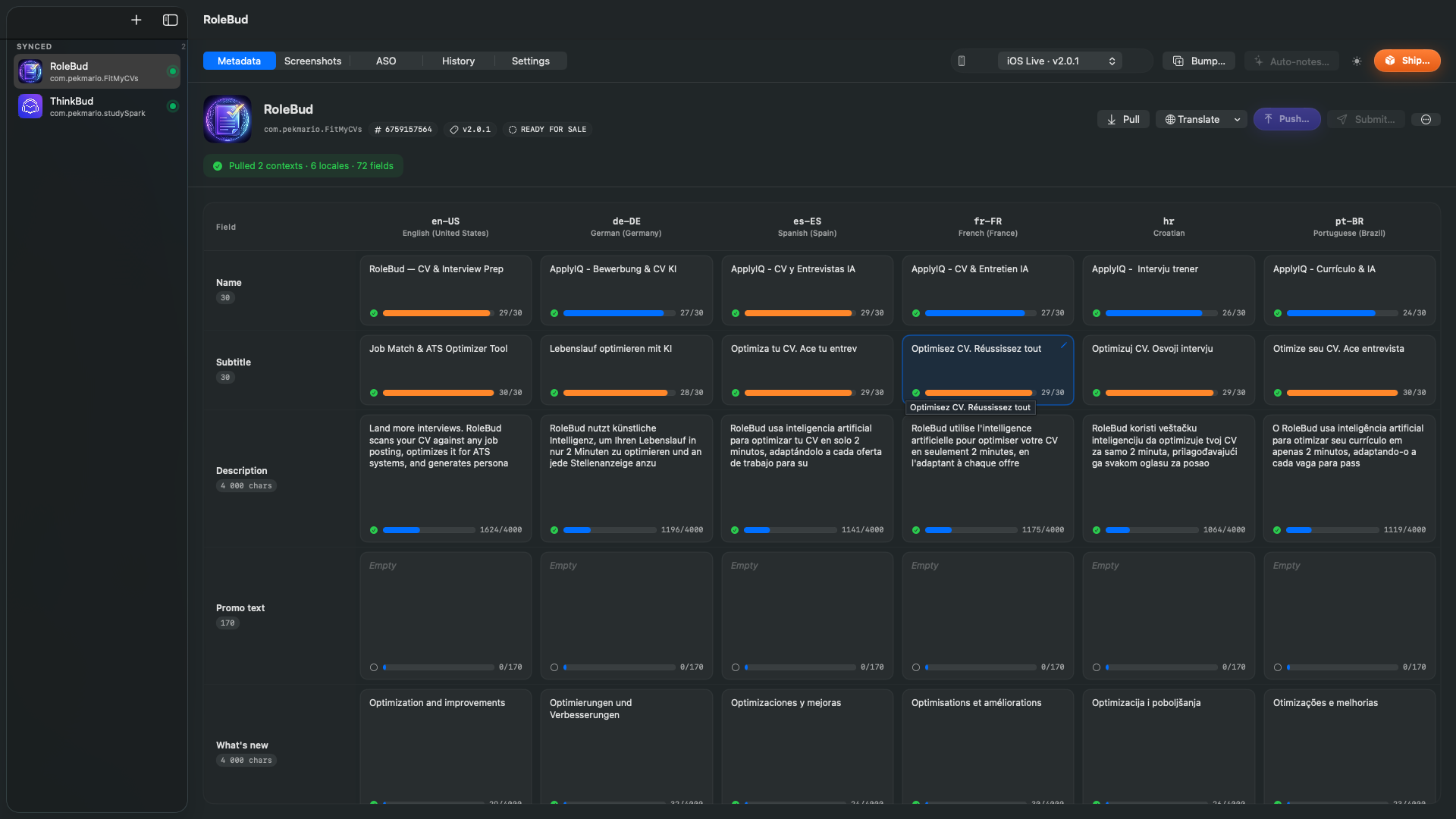
// Metadata
Every locale, side-by-side.
Pull title, subtitle, description, keywords and What's New from App Store Connect once. Edit in one grid that respects every length limit — then translate missing fields to every locale with Claude, your brand voice and protected terms enforced.
- ✓ Live 30 / 30 / 4 000 char counters per cell
- ✓ Per-app brand voice, glossary, protected terms
- ✓ Atomic Push with full diff preview
// Screenshots
Native screenshots, no Figma.
Real iPhone 6.9″, iPad Pro and Mac device chrome. Drop in your captures, layer text, pick a theme — and translate every text layer to all your locales in one click. Each design auto-routes to the correct device row when you Add to Screenshots.
- ✓ iPhone 6.9″ · iPad Pro 13″ · iPad Pro 11″ · Mac
- ✓ Per-locale text variants from one source canvas
- ✓ Click-to-zoom lightbox + Mac-native export
// ASO
Track keywords. Watch the field.
Add the keywords your users actually search. Asomium logs your rank, popularity, difficulty and opportunity score per keyword × locale, daily. Stack competitors next to your app to compare what they target — find what's actually working in your category, not what a vague dashboard claims.
- ✓ Per-keyword popularity · rank · difficulty · opportunity
- ✓ Auto-discover via App Store autocomplete sweep
- ✓ macOS notifications when ranks shift overnight
- ✓ Stacked competitor comparison view
- ✓ Reply to reviews with an AI draft in the reviewer's language
// Ship
Archive, upload, submit — one click.
Asomium runs xcodebuild archive, exports the .ipa, uploads to App Store Connect, auto-attaches the build to your editable version, and unblocks Submit-for-Review. Need testers first? One sheet sends the same build to your TestFlight beta groups — "What to test" notes included. Smart build-number bump prevents the "duplicate build" rejection every indie has hit at least once.
- ✓ Smart CFBundleVersion bump across machines
- ✓ Auto-attach + Submit gate sync
- ✓ TestFlight beta submission with per-group "What to test"
- ✓ Live log + processing-state poll loop
// Revenue
Sales + funnel, in the same window.
Pull Sales Reports + Apple Analytics (impressions → page views → first-time downloads → proceeds) on demand. Hover-scrub the chart, drill into a country or SKU, overlay your own metadata pushes + keyword shifts on the timeline, then ask AsoAI what actually moved the needle.
- ✓ 7 / 30 / 90-day proceeds + period-over-period delta
- ✓ Every storefront currency summed into yours at the ECB rate — marked as an estimate, Apple's own figures one click away
- ✓ Conversion funnel via Apple Analytics Reports API
- ✓ Country, SKU + discovery-source breakdowns
- ✓ Push / keyword / version events overlaid on the chart
- ✓ "Ask Claude what happened" honesty-constrained analysis
One click. Five extra English storefronts.
Most indie devs ship to en-US and leave en-AU, en-CA, en-GB, en-IN, en-SG empty — forfeiting ranking in five high-intent storefronts to whoever bothered to fill them in.
Asomium's Translate menu has Expand to all English locales — one click clones en-US across all five English variants, with Claude tweaking spelling (color/colour), slang and market norms. Suddenly your app is indexed in six English storefronts instead of one.
That alone has paid for Asomium on the apps we ship it with.
ASO is one tab. Asomium is the whole window.
Other tools cover keyword research really well. Asomium covers it too — and the four other surfaces you'd otherwise patch together by hand.
// without asomium
- ✗ Click through the ASC web UI to update each locale, one form at a time
- ✗ Translation in a separate tab, then paste back, then realise it's 3 chars too long
- ✗ Mock screenshots in Sketch, export per device, upload one-by-one per locale
- ✗ ASO + revenue + competitor analysis in three different paid SaaS tabs
- ✗ Build, archive, upload, attach to next version, submit — five separate manual steps
- ✗ Wait until you're back at the Mac to ship a hotfix
// with asomium
- ✓ One grid for every locale of every app — edit side-by-side with live char counts
- ✓ Claude translations w/ brand voice + glossary, respecting char limits at push time
- ✓ Design one screen → Asomium renders the full localised set, auto-translated text overlays
- ✓ All three in one native window. Real keyword ranks, real revenue, real competitor metadata
- ✓ One button. Self-heals when Apple complains about encryption / support URL / missing build
- ✓ Drive the whole pipeline from Claude Dispatch on your phone, via MCP
| surface | asomium | aso-only |
|---|---|---|
| Metadata editing across locales | ✓ | — |
| AI translation with brand voice | ✓ | — |
| Screenshot generator (real device chrome) | ✓ | — |
| Keyword + rank tracking | ✓ | ✓ |
| Competitor stack view | ✓ | ✓ |
| Revenue + funnel analytics | ✓ | — |
| Build · upload · submit pipeline | ✓ | — |
| Native Mac · no browser | ✓ | ~ |
| Credentials in Keychain | ✓ | ~ |
| MCP server (42 tools) | ✓ | — |
✓ available · ~ varies by vendor · — not supported
one plan.
AsoAI translations, ASO audit and revenue analysis are bundled — there's no AI key to wire up, no compute bill to track. Pay monthly for the flexibility or annually for the best price.
Asomium Pro
Best value Most flexible€119.99 billed once a year — save 33% vs paying monthly. AsoAI is included.
Billed monthly · cancel anytime. AsoAI is included.
- ✓ Unlimited apps + platforms
- ✓ Metadata editor across all locales
- ✓ AsoAI translation, audit + keyword suggestions
- ✓ Screenshot generator · iPhone / iPad / Mac
- ✓ ASO keyword + competitor tracking
- ✓ Revenue + funnel analytics
- ✓ Build · upload · submit pipeline
- ✓ MCP server — all 42 tools
- ✓ Priority email support
// card required · free for 3 days, then €119.99/yr · cancel anytime
// notarized DMG outside the Mac App Store · payments processed by Lemon Squeezy (handles VAT + sales tax globally) · license key arrives by email; paste into the Mac app to activate · move between Macs at any time
questions? info@nativefirstapp.com
Requires macOS 15 Sequoia or later